

Discover powerful (and free!) SEO tools to boost your visibility, attract more visitors, and help customers find your business online.
Summary: SEO doesn’t have to be complicated or time-consuming. These five free SEO tools can help your microbusiness get found online by showing you how your site appears in search, what your audience is looking for, and where small improvements can make a real difference. Used together, they offer a practical, sustainable way to build visibility and confidence in your digital marketing efforts.
Introduction
If you run a microbusiness, you already know how much there is to juggle. Marketing often falls into the “I’ll get to it later” category—not because it isn’t important, but because it can feel confusing or overwhelming. SEO is a good example of that. It’s talked about as if it’s complicated, technical, or only useful for big companies with big budgets.
The truth is, SEO is really about understanding how people find you and making it easier for them to do so. With a few practical tools and a little consistency, you can start improving your online visibility without turning it into a full-time job. The tools in this article are designed to help you do exactly that—giving you clarity, direction, and a manageable way to help your microbusiness get found online.
Table of Contents
- Google Search Console: See What Google Sees
- Google Analytics: Understand Your Visitors
- Ubersuggest: Find Keywords You Can Actually Rank For
- Ahrefs Webmaster Tools: Monitor and Improve Your Site’s Health
- AnswerThePublic: Discover What Your Audience Is Asking
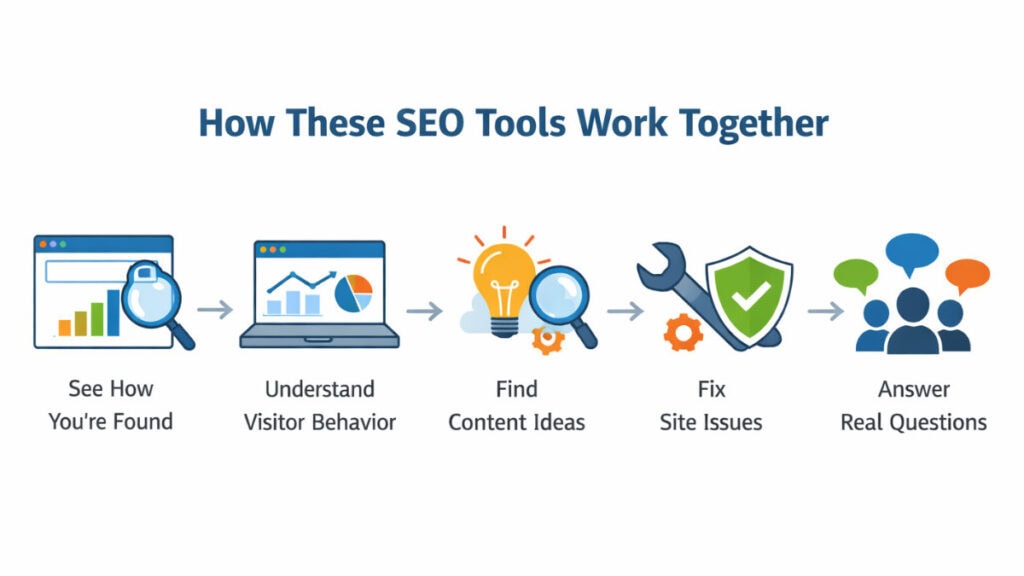
1. Google Search Console: See What Google Sees
If you want to understand how your website performs on Google, Search Console is your best starting point. It’s a free tool from Google that shows exactly how your site appears in search results—and what’s driving traffic your way.
Search Console helps you track your keywords, monitor performance, and fix issues that could keep your pages from showing up. You can see which search terms people use to find you, how often your pages appear, and how many clicks they get. You’ll also find reports that highlight broken links, mobile usability errors, and indexing problems that might hurt visibility.
Why it matters for your microbusiness
When you’re running a microbusiness, every visitor to your website counts. You might not have a marketing department or an SEO consultant on call—but with Google Search Console, you can see what’s working and what’s not. It takes the mystery out of why one page gets attention while another barely shows up.
Maybe you’ll notice that a blog post about your services gets a lot of impressions but few clicks—that’s your cue to update the title or description. Or maybe you’ll realize your business name is showing up more after sponsoring a local event—a sign that your community outreach is building real awareness online.
That kind of clarity isn’t just helpful—it’s empowering.
SEO is just one part of building a strong digital foundation. If you’re thinking about your broader setup, you may also find 5 Essential Tech Tools for Your Solopreneur Success helpful.
How to get started
- Go to Google Search Console.
- Add your website and verify ownership (usually through your domain host).
- Check the Performance tab to see your most popular search queries and pages.
- Visit Pages under Indexing to ensure Google can access everything important.
Tech Tip: Check the Queries report each week. It shows the exact words people type before finding your site—a goldmine for discovering what your audience really wants.
2. Google Analytics: Understand Your Visitors
Once you know how people are finding your site, the next step is understanding what they do once they get there. That’s where Google Analytics comes in. It’s one of the most powerful free tools available to small businesses—and when used together with Search Console, it gives you a complete picture of how visitors discover and interact with your business online.
With Google Analytics, you can track who’s visiting your site, where they’re coming from, and which pages hold their attention the longest. You can see whether your traffic comes from search, social media, or referrals, and even track what actions people take—like subscribing to your newsletter or clicking your contact form.
Why it matters for your microbusiness
Your website isn’t just a digital brochure—it’s part of your customer journey. Analytics helps you understand that journey. Maybe you’ll discover that most of your visitors come from mobile devices, meaning it’s time to check how your site looks on a phone. Or you might notice that people drop off right before checking out—a signal that your purchase process needs a tweak.
These insights can mean the difference between guessing and growing. Instead of wondering what’s working, you’ll know. It’s like having a steady stream of customer feedback, but in numbers and patterns that reveal what your audience values most.
How to get started
- Go to Google Analytics.
- Sign in with your Google account and create a property for your website.
- Add the tracking code to your site (WordPress users can use a plugin like Site Kit by Google).
- Explore key reports under Engagement and Acquisition to see how people find and interact with your site.
Pro Tip: Connect Google Analytics with Search Console for deeper insights—you’ll see not just what people searched for but also what they did after they arrived.
3. Ubersuggest: Find Keywords You Can Actually Rank For
If you’ve ever tried to write blog posts or website copy and wondered, “What should I even talk about?”—Ubersuggest is about to become your new favorite tool. This free keyword research platform helps you discover what people are searching for and how competitive those search terms are.
With Ubersuggest, you can see keyword ideas, search volumes, and SEO difficulty scores. You’ll find out whether a topic is too crowded to compete in or if there’s a sweet spot where your business can shine. It also provides content suggestions and site audit insights that highlight ways to improve your pages.
Why it matters for your microbusiness
Keyword research often sounds like something reserved for big marketing teams—but it’s really just about understanding what your customers are looking for. Tools like Ubersuggest help level the playing field. You don’t need a huge budget to create content that gets noticed; you just need to choose the right topics.
For example, instead of trying to rank for a broad term like “business coach,” you might find more success with something specific like “small business coach in Austin” or “affordable business coaching for startups.” These longer, more detailed phrases often have less competition and attract visitors who are ready to take action.
When you focus on what your audience is actually searching for, your marketing becomes more intentional. You’re not just posting content—you’re answering real questions and showing up when someone needs your expertise.
How to get started
- Visit Ubersuggest.
- Type in a topic related to your business (like “custom cakes” or “marketing tips”).
- Review keyword suggestions, search volumes, and difficulty scores.
- Save 3–5 long-tail keywords to guide your next blog post or page update.
Tech Tip: Look for keywords with moderate search volume and low competition. They may not bring in thousands of clicks overnight, but they’ll help you build steady, sustainable traffic that converts.
4. Ahrefs Webmaster Tools: Monitor and Improve Your Site’s Health
If you’ve ever wondered why your website isn’t ranking as high as it should—or where to start fixing it—Ahrefs Webmaster Tools is one of the best free solutions available. It’s like a health checkup for your website, showing you what’s working well and where your SEO might need a boost.
Once you verify ownership of your site, Ahrefs scans it for technical and on-page issues. You’ll see reports on broken links, missing meta tags, slow-loading pages, and other factors that can affect visibility. You’ll also get insights into your backlinks—the external sites that link to yours—which play an important role in search engine trust and authority.
Why it matters for your microbusiness
Most small business owners don’t have the time or budget to hire an SEO agency, but that doesn’t mean they can’t compete. Ahrefs gives you access to data that large companies pay thousands of dollars for—but presented in a way that’s usable even if you’re doing this on your own.
You might discover that your “About” page has several backlinks from local directories, or that your contact page loads too slowly and needs attention. These kinds of insights help you focus your time where it matters most and make steady improvements over time.
Many of the issues Ahrefs highlights—like slow pages, broken links, or missing metadata—tie back to core website fundamentals, which are covered in 7 Must-Have Features Every Small Business Website Needs.
How to get started
- Go to Ahrefs Webmaster Tools.
- Sign in with your Google account and verify your website.
- Run a Site Audit to identify technical issues and optimization opportunities.
- Review your backlink report to see which external sites link to yours.
Tech Tip: Pay attention to your site’s Health Score. Fixing one or two key issues each month can keep your website in strong shape without feeling overwhelming.
5. AnswerThePublic: Discover What Your Audience Is Asking
Sometimes the hardest part of content marketing isn’t writing—it’s knowing what to write about. AnswerThePublic helps by showing you the real questions people are typing into search engines.
Enter a keyword related to your business, and the tool generates a visual map of questions and phrases. You’ll see what people want to know, how they ask it, and which topics keep coming up—making it easier to plan blogs, videos, FAQs, and social content that actually resonates.
Why it matters for your microbusiness
When you’re running a one-person operation, creating consistent content can feel like a guessing game. AnswerThePublic removes that guesswork by helping you align your content with real needs.
For example, a coffee shop owner searching “coffee beans” might see questions like “which coffee beans are best for cold brew?” or “how should I store coffee beans at home?” Each one is a ready-made content idea that helps build trust and visibility.
When your business shows up with helpful answers, you naturally build credibility with your audience.
How to get started
- Go to AnswerThePublic.
- Enter a keyword or phrase related to your products or services.
- Explore the visual chart or download the list of questions.
- Use those insights to plan your next content pieces.
Tech Tip: Look for questions that start with how, why, and which. These often signal strong intent and make great blog titles.
Key Takeaways
- SEO doesn’t have to be overwhelming or expensive to be effective.
- A few free tools can help you understand how people find your site and what they do once they arrive.
- Keyword research is about answering real questions, not chasing trends.
- Small, consistent improvements often matter more than big one-time changes.
- Using data as a guide makes marketing clearer and easier to manage.
Final Thoughts
Getting found online isn’t about doing everything at once or mastering every marketing tactic. It’s about understanding what’s working, making a few informed adjustments, and building from there. With the right tools and a steady approach, SEO becomes a practical part of running your business.
The goal isn’t perfection—it’s progress. As you get more comfortable using these tools, you’ll start to see patterns, gain clarity, and make decisions with more confidence. Over time, those small steps can lead to stronger visibility and a more sustainable digital presence for your microbusiness.
Your turn: Have you tried any of these tools before, or are there others that have helped you get found online? Share your experience in the comments—your insights might help another business owner who’s just getting started.